CalendarAnything Availability Timeslot Generation
If your business has requirements that go beyond our out-of-the-box features, reach out - we offer custom development services for CalendarAnything to meet your unique needs.
Availability calendar time slots are generated based on the following factors:
- Availability templates of resources
- Timeslot Duration and Timeslot Step Duration set in Availability calendar setup
- Fixed Grid setting being enabled or disabled
This article explains how the Fixed Grid setting determines timeslot adjustments when a booked appointment is updated to start or end outside of the configured times.
Initial Booking
After an Availability calendar timeslot is booked, the slot is removed from the calendar. The remaining timeslots remain as they were.
- Before

- After Booking 10:00 to 11:00 timeslot.

User Updates Booked Event to Start or End Outside of the Configured Timeslot
A user can update a booked meeting event to start or end outside of the originally configured timeslot. In the example below, the user updates the booked meeting event to end 30 minutes earlier than the configured timeslot.
User updates meeting event to be 30 minutes shorter. 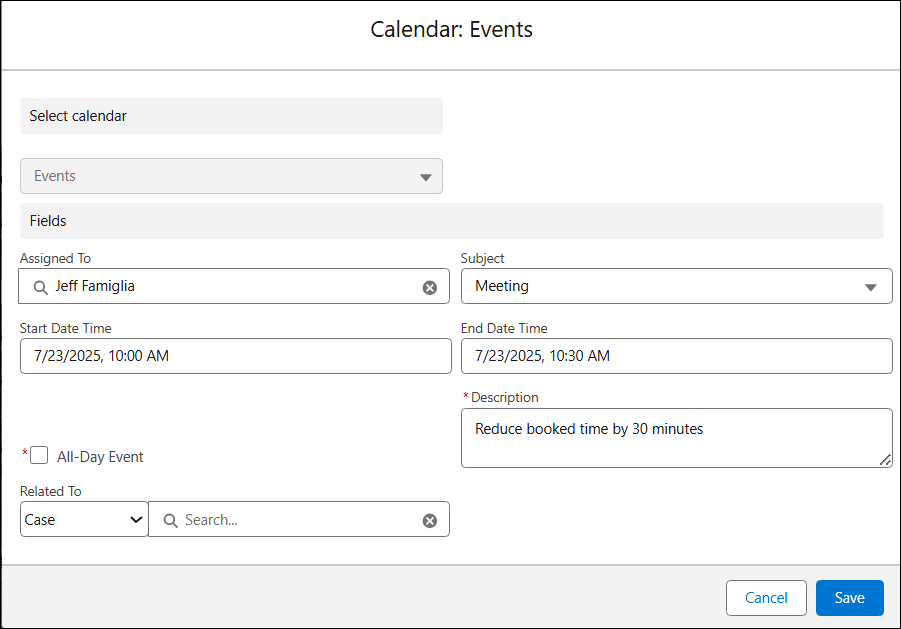
The application readjusts the remaining timeslots based on whether the Fixed Grid calendar setting is on or off.
Fixed Grid Off
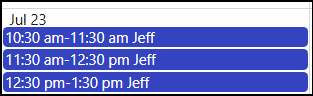
If Fixed Grid is off (not enabled), the timeslot after the booked appointment is updated to start when the updated booked appointment ends. All timeslots after that are adjusted accordingly.
Fixed Grid On
If Fixed Grid is on (enabled), the application attempts to keep as many of the remaining timeslots as originally configured.
In the case of the booked meeting being updated to end 30 minutes earlier, the application ignores the leftover 30 minutes and leaves remaining timeslots as they were.

If the booked meeting event had been updated to last 15 minutes longer than originally configured, the timeslot booked as well as the timeslot into which the new end time extends would both be removed from the Availability calendar. Subsequent timeslots would remain as they were.

To Update the Fixed Grid Setting
To update the Fixed Grid setting, follow these steps:
- Right-click the Availability calendar name on your sidebar and select Edit.
- On the calendar setup wizard, select the General step
- To enable the Fixed Grid option, select the Fixed Grid checkbox so that it contains a checkmark.
- To disable the Fixed Grid option, make sure the Fixed Grid checkbox is cleared.
- Click Save.